mirror of
https://github.com/jellyfin/jellyfin.git
synced 2026-01-23 23:20:51 +01:00
Multi disc music albums are displayed as separate albums #2846
Labels
No labels
area:database
awaiting-feedback
backend
blocked
breaking change: web api
bug
build
ci
confirmed
discussion needed
dotnet future
downstream
duplicate
EFjellyfin.db
enhancement
feature
future
github-actions
good first issue
hdr
help wanted
invalid
investigation
librarydb
live-tv
lyrics
media playback
music
needs testing
nuget
performance
platform
pull-request
question
regression
release critical
requires-web
roadmap
security
security
stale
support
syncplay
ui & ux
upstream
wontfix
No milestone
No project
No assignees
1 participant

Notifications
Due date
No due date set.
Dependencies
No dependencies set.
Reference: starred/jellyfin#2846
Loading…
Add table
Add a link
Reference in a new issue
No description provided.
Delete branch "%!s()"
Deleting a branch is permanent. Although the deleted branch may continue to exist for a short time before it actually gets removed, it CANNOT be undone in most cases. Continue?
Originally created by @RedKong on GitHub (Mar 24, 2021).
Version: 10.7.1
Operating System: Windows 10 20H2
The expected and correct behavior would be a single album, that lists all tracks, separated in different sections by the "Disc #" line.
The "Disc #" line is already present, but useless.
Moreover, the "albums" appear in random order in the standard A-Z sorting.
Images below are current state.

This is the first in the image above, note that it is Disc 3 (the following is number 8, it's random)

@dkanada commented on GitHub (Mar 24, 2021):
Album detection is mostly folder based so if you move them all to the same folder it should work.
@RedKong commented on GitHub (Mar 24, 2021):
I see, thanks for the answer.
So changing the folder structure of my entire library where multi disc albums appear would be the only work-around in this case? moving the contents of all these folders inside a single one?

I still consider this a bug, every other music player/library manager that I have ever used (from Winamp, to Emby, to Samsung music, etc. etc...) does not work like this but uses the "ALBUM" tag, not the folder structure.
Especially Emby, which I thought would be the behavior inherited by Jellyfin.
If this somehow is not considered a bug then I guess I should make this a feature request.
@Zunawe commented on GitHub (Apr 6, 2021):
It used to be the case that separate directories for each disc in a single album would be detected correctly. Not sure how it got changed. The Jellyfin docs even still recommend this folder structure.
@cvium commented on GitHub (Apr 7, 2021):
@RedKong Is your music library in Jellyfin set to
Music/OSTor justMusic? I can only replicate the behaviour with the former, which does not adhere to the recommendation.@RedKong commented on GitHub (Apr 7, 2021):
If you mean this, then it's

Music/OSTI have been using these settings since Emby (long before actually), without any problems, I wasn't aware the recommendation were against this.
(https://jellyfin.org/docs/general/server/media/music.html#discs other than the "artist" folder, which I strongly dislike from an organizational point of view, this looks fine to me)
If I were to set the library path to
Musicwouldn't it include other stuff I have inside that folder? Which I don't want in the same library in Jellyfin.@cvium commented on GitHub (Apr 7, 2021):
Yes it would.
I did some more digging and it looks like your setup worked before 10.7, but another bug was fixed in 10.7, which "broke" your setup: https://github.com/jellyfin/jellyfin/pull/4968
The problem is that your folder structure was never officially supported, so I'm not sure how to proceed from here.
@Zunawe commented on GitHub (Apr 7, 2021):
I'm in the same boat. My library is set up like this:
with no separation by artist. Lots of my albums are the only album in my library from that artist and some albums are collaborations between a couple artists with their own individual albums, so it only makes the organization sloppier and more confusing to separate albums by artist. Not to mention albums created by "various artists".
@RedKong commented on GitHub (Apr 7, 2021):
@cvium When you said:
Do you mean that if you set the library to the latter, a direct sub-folder of root, then you see the albums/discs displayed correctly even with my folder structure?

I tried to create a library set to
F/Test, put inside it a multi-disc album and the bug is still there for me.Also noticed another bug, under the artist view I see double the number of albums, still in random order:
16 "albums" instead of 8 (well, of course it should be just 1)
Regarding the fact that it was never officially supported, it looks to me like it was, according to the documentation.

It is also still linked in the media library creation process, it takes you to the link I (and Zunawe before me) posted before.
Is the missing "Artist" folder the problem?
@Zunawe I saw your reply while I was typing. I have the same setup and the same opinion, in this case organizing by artists is extremely inconvenient, to say the least.
What would the recommended folder structure look like? Flat inside the album folder with no "Disc" folder?
If that's the case, I say again that is not desirable and also not needed by a single other program that I know of.
I think that bugfix #4968 just shifted the problem, this is a deeper issue about how albums (and loose files #2879) are detected and handled, and that change of priority passes the problem from one side to the other.
@nsonnad commented on GitHub (Apr 8, 2021):
Chiming in to say that I'm having the same issue and that something has definitely changed here. Since upgrading to 10.7 the folder structure of
Album/Disc Xno longer displays multi-disc albums as a single entity, rather splits each one out into its own thing. Which is very inconvenient, and it definitely used to display on a single page. (I'm sure of it as I've been collecting lots of anthologies lately.) My music is in a beets library so it's easy enough to change the folder structure around, but I do have a personal preference for having each disc in a separate folder, and as discussed that is officially mentioned in the docs.@RedKong commented on GitHub (Apr 13, 2021):
I made a new folder in explorer F:\temp\Artists
Then I created a test library pointed to F:\temp and it seems to work correctly.
If I take an album out of \Artists and put it into the above \temp then the bug appears again.
The first two albums (in reality one album) exhibit the bug and are in \temp, the other two do not and are in \temp\Artists.
Looking at this difference in behaviour I guess that the the work-around is to not point the library directly to where the album folders are located (the dummy "Artsits" folder name should not matter, right?).
It does not actually require a, let's say accurate, artists folder organization
I don't know if this is the right place to ask, but is there a way to now re-point my original library to a different path that includes the dummy "artists" folder without needing to rescan everything?
To make it clearer, now the library is pointed to F:\Music\OST and all the album folders are there as well
in explorer I make a new folder F:\Music\OST\Artists
I move all the album folders from \OST to \OST\Artist
Do I really have to rescan? Can't I migrate or something similar?
@RedKong commented on GitHub (Apr 29, 2021):
Just to confirm the efficacy of the work-around method, which I have tested over my entire library and can confirm it to be working normally. I would add the work-around tag but I don't know how.
To summarize, you must not point the library directly to the folder where the multi discs albums are located, point it to one folder level above.
There is no need to have the albums categorized by artists as stated in the documentation (documentation which, as discussed in this thread, apparently was and now still is outdated/wrong)
@Zunawe commented on GitHub (Apr 30, 2021):
The docs might be misleading by leaving it ambiguous whether the name of the artist folder must match the tags of the music in that folder, but I wouldn't necessarily argue that they're wrong. I don't think there's much reason to update the docs.
However, I'll advocate that this get turned into an enhancement. Obviously there are Jellyfin users for which the artist folders are inconvenient, and the fact that the solution is to create a dummy folder just to have an extra node in the tree I think is a good indicator that something needs to be improved.
@Kurozeto commented on GitHub (Jun 6, 2021):
Two features that could be added are the ability to add a disc number to the metadata, and a merge feature in the event that album recognition fails. This is something that Plex has implemented and allows for more control over the library's structure.
@Zunawe commented on GitHub (Jun 6, 2021):
Songs already have a disc number metadata field, and Jellyfin already acknowledges it and lets you edit it from the web UI. Jellyfin doesn't seem to do anything to try to group albums based on metadata, which I think makes sense. You're not guaranteed two albums with the same name are the same album. Or even two albums with the same name by the same artist. Better to rely on folder structure because it's a more explicit separation of albums.
Merging might also already exist. If you select two albums in the web UI and click the three dots, there's an option to "Group versions". I don't want to actually click the button in case it's hard to reverse.
And even so, as some random user, I'd still rather have my library's format be detected automatically without having to group every multidisc album via the UI.
@Kurozeto commented on GitHub (Jun 6, 2021):
It didn't occur to me that the disc label was at the song level and not the disc level.
In that matter, I've gone ahead and performed the experiment on a 3-Disc album.
First by individually labeling each song with their appropriate disc, and then attempting to merge them into a single album with the "Group Versions" option.
The conclusion is that the "Group Versions" option does not merge individual discs into a single album. Even after refreshing the metadata on the library, there is no change to the structure.
@stale[bot] commented on GitHub (Oct 12, 2021):
This issue has gone 120 days without comment. To avoid abandoned issues, it will be closed in 21 days if there are no new comments.
If you're the original submitter of this issue, please comment confirming if this issue still affects you in the latest release or nightlies, or close the issue if it has been fixed. If you're another user also affected by this bug, please comment confirming so. Either action will remove the stale label.
This bot exists to prevent issues from becoming stale and forgotten. Jellyfin is always moving forward, and bugs are often fixed as side effects of other changes. We therefore ask that bug report authors remain vigilant about their issues to ensure they are closed if fixed, or re-confirmed - perhaps with fresh logs or reproduction examples - regularly. If you have any questions you can reach us on Matrix or Social Media.
@RedKong commented on GitHub (Oct 12, 2021):
Prompted by the stalebot, I confirm the issue still persists, with no alterations, in Version: 10.7.7
I am still using the same work-around mentioned in my last post here, which continues to work fine.
@Tau5 commented on GitHub (Dec 13, 2021):
I can also confirm that this continues being an issue
@ClementNerma commented on GitHub (Jun 13, 2022):
For info this is still an issue after the latest update.
@LinAGKar commented on GitHub (Jun 24, 2022):
Why? Albums are set in a tag in the files, the folder structure should be completely ignored.
@Zunawe commented on GitHub (Jun 24, 2022):
For a quick plausible counterexample, two performances of Beethoven's 5th symphony might be given the same "album" title in the tags. They may even be given the same album title and be published in the same year.
There are plenty of edge cases where you would want to distinguish albums based on which folder they're in rather than tags in the metadata.
However I still think being required to separate by artist is annoying and extraneous.
@LinAGKar commented on GitHub (Jun 24, 2022):
In that case you would probably need to add some qualifier to the album name, or they would be indistinguishable anyway.
@Fangh commented on GitHub (Aug 25, 2022):
I manage to make it almost working :
Instead of :
I did :
But the thing is that Jellyfin show me 9 albums :
@RedKong commented on GitHub (Sep 16, 2022):
I think the workaround I posted above https://github.com/jellyfin/jellyfin/issues/5605#issuecomment-829556447 is still the best (the only, in fact) way to have this functionality work as it should.
With the latest updates however, another thing has broken, now all the multi discs album don't have a cover in the library view.
consider the first and last albums
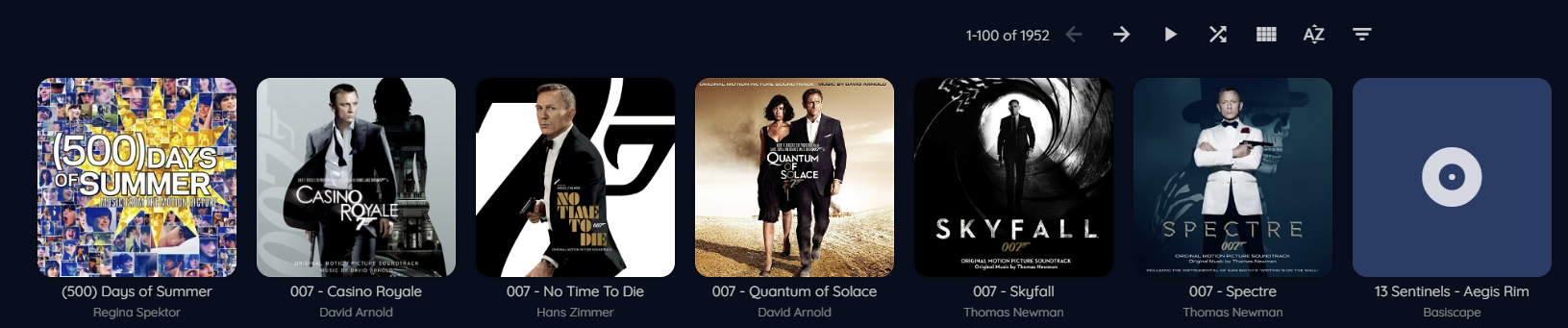
If I remove one layer from the library path (the layer needed to make jellyfin correctly identify multi disc albums)
from
to
then the covers do appear...
along with the same old bug of every disc appearing as a separate album
I only ever tick "image extractor" from the library options, so maybe this is broken now too, being decoupled from the album and only tied to the folder (silly behaviour in that case)
I urge to reconsider the direction multi discs album support is heading, this is is contrast to every single other program I have ever used and it doesn't make logical sense.
Detection, display and grouping should be based on tags, that is one of the reasons they exist
EDIT;
I have tried manually setting the cover for the album through Jellyfin, it doesn't work, it gets reset at the next library scan
@RedKong commented on GitHub (Sep 26, 2022):
Version 10.8.5
Same behaviour, the bug is still present.
@cvium commented on GitHub (Oct 9, 2022):
You don't have to bump this on every release. If/when this will be fixed, this issue will be closed.
@trentks commented on GitHub (Nov 9, 2022):
Just adding to this issue, I think structuring your folders to have "Disc" is pretty acceptable. But this work-around fails when the "disc type" is "Digital Media" (ie instead of a folder being "Disc 1"/"CD 1"/"Disk 1", all of which works, it's "Digital Media 1")
A lot of music is released digitally, and this is an increasingly popular term for splitting (which lidarr correctly accounts for), I've submitted a pull request #8713 to address this.
@nodecentral commented on GitHub (Nov 23, 2022):
Just adding to this thread to show my support for this being fixed, and there being clear guidance on how muti-disc albums are handled with Jellyfin.
Quick Question: When Jellyfin does take a 3 disc album and separates it into 3 seperate albums, how best do I get the three updated to one again? Do I delete and refresh the whole metadata, or is there a way I can just focus on that one album ?
@RedKong commented on GitHub (Nov 27, 2022):
"To get the three updated again", do you mean refreshing after having applied the work-around? I think it is sufficient to remove the folder, scan for new, work-around and then scan again.
I have a question too, is anyone else having the problem of the missing artwork images, the ones obtained by jellyfin with "image extractor", affecting exclusively every multi-disc albums in the library?
@nodecentral commented on GitHub (Nov 27, 2022):
Hi @RedKong
Forgive the obvious question, but what do you mean when you say ‘remove the folder’ ? I’ve renamed the sub folder to
Disc 1,Disc 2andDisc 2- How do I just ‘remove’ the current one from my library, as the UI only gives me the option to Delete, which will remove it from the file system and my media library ?@RedKong commented on GitHub (Nov 27, 2022):
forgive me, you are right I wasn't clear.
You are right, delete will remove it from the disk.
I meant moving the folder out of jellyfin's library folder path.
Let's say you have your library set to C:\Music, move the album folder out of \Music, as far as Jellyfin is concerned the album has been deleted.
Scan to update jellyfin's database, move the folder back inside \Music, scan again.
But if you only renamed the subfolders to Disc#, then I think it's not enough, they will show up as 3 separate albums.
Best workaround now, as discussed here, seems to be adding a layer inside the library path.
So if your library is pointing to C:\Music, you would create a new folder C:\Music\test (name doesn't matter)
And then move all your album folders inside \test, without changin anything in Jellyfin.
This way disc detection works as it should... but then the "image extractor" for the album covers breaks.
@nodecentral commented on GitHub (Nov 27, 2022):
Thanks @RedKong
FYI - The original hierarchy of all my music was as follows…
C:\Music
C:\Music\Album Name
C:\Music\Album Name\ Album Name - Disc 1
C:\Music\Album Name\ Album Name - Disc 2
So I have updated the disc subfolders to the following ..
C:\Music
C:\Music\Album Name
C:\Music\Album Name\Disc 1
C:\Music\Album Name\Disc 2
@RedKong commented on GitHub (Nov 27, 2022):
And does that work correctly?
If your library is pointing to
C:\Musicand if I got this right it should be affected by this bug.So you would see two albums with the sama name in Jellyfin, instead of one containing two discs.
If that is the case, you can try leaving the library in Jellyfin as it is, pointed to
C:\Musicthen creating a folder
C:\Music\*whatever_you_want*\and move all your album folders inside:
This should work.
@nodecentral commented on GitHub (Nov 28, 2022):
No, it seems it doesn’t; the
Disc 1,Disc 2route e.g. under\Music\Album Name\Disc 2did not work for me..I’ll try your suggestion e.g.
\Music\JellyfinBug\Album Name\Disc 2and report back…@nodecentral commented on GitHub (Nov 28, 2022):
@RedKong - the alternative approach, adding another subfolder i.e.
\Music\JellyfinBug\Album Name\Disc 2didn’t work either..@RedKong commented on GitHub (Nov 28, 2022):
Either the workaround isn't as good as I thought or I have given you the wrong instructions, I'll try to replicate it now.
ALL the settings are unchecked, save for "Image Extractor"
After Jellyfin has finished scanning the library, I get this:
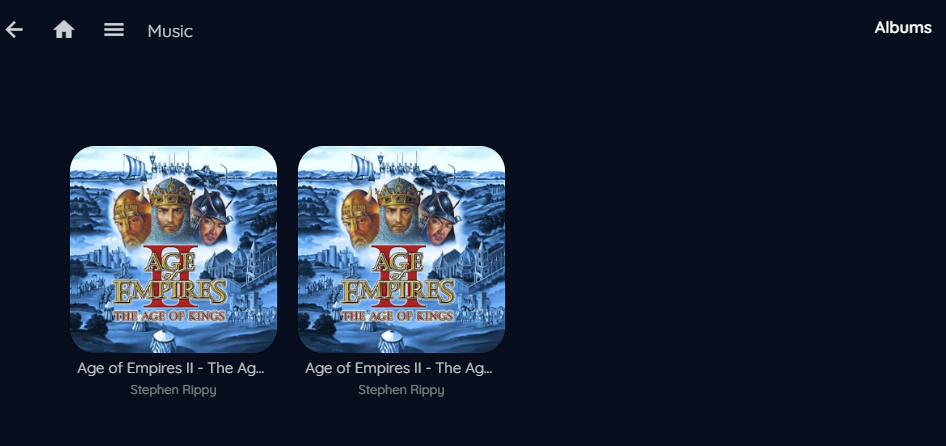
The bug shows up here, two "albums", which are in fact Disc 1 and Disc 2
I hit refresh metadata in Jellyfin
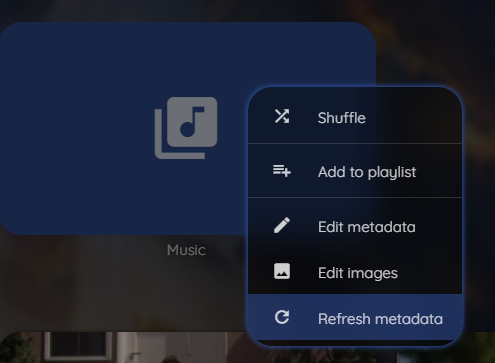
I get the correct and expected behaviour, a single album that contains the two discs

Now, the workaround seems to be functioning ok on my end, I am not sure what could be difference on your configuration.
Also, as I have mentioned and as everyone can see in the screenshots, this breaks the image extractor and I get a blank image for the album cover.

Note that the tracks do have the correct cover when played.
It is frustratingly limited only to the general album cover...
@nodecentral commented on GitHub (Nov 28, 2022):
Hi @RedKong.
Thanks for that, and if I’ve understood you correctly - you’re suggesting I add another layer (subfolder), which places the
Disc xfolders at the 5th level from the top folder chosen in the Jellyfin library ??Original directory structure = Creates separate albums =
\Music\Album Name\Disc 2Alternative directory structure 1 = Creates separate albums =
\Music\JellyfinBug\Album Name\Disc 2Alternative directory structure 2 = Should Work ?? =
\Music\JellyfinBug\AnotherFolder\Album Name\Disc 2@Zunawe commented on GitHub (Nov 28, 2022):
I think you've been confused because they created a test folder in which they tried to reproduce your problem. You'll notice in their config they have their music library set to a folder named
test.What's happening here is that Jellyfin expects albums to be in subdirectories containing the names of artists.
Music/Artist/Album/Disc 1/Song.mp3. And the workaround we've found here is to create a single folder at theArtistlevel to hold ever album in the library. That folder's name is inconsequential.If you're following that practice and seeing a different issue, I'm not sure what would cause that.
@RedKong commented on GitHub (Nov 29, 2022):
Zunawe is exactly correct, I apologize for my poor explanation.
I am just reiterating here, or summarising:
If the current implementation is intended, it is not consistent. If it is supposed to be folder based then the "albums" should be called Disc 1 and Disc 2; instead the title is extracted from tags.
The required /$artist/ folder is completely ignored too, save for its presence, to the extent that we are literally naming it /jellyfinbug/ here.
More fundamentally, for what purpose would one organise their library with thousands of "artists" folders, of which the vast majority would end up contain a single album. This is redudant, and adds nothing if not more unnecessary complexity.
(On a colleague's computer I have seen an endless list of folders, each named month-day-year, and each containing a single file which has that same date as the filename. All this done by hand. The current jellyfin implementation weirdly reminds me of that act of utter brilliance.)
Let's say I want to navigate the folder structure and copy all the Metal Gear albums. As it is I have them right there, in alphabetical order, instead of how many artists folders scattered all over the place.
How would multi-artists albums work? An ugly and comparatively un-organized "Various Artists" or "Misc" folder that ends up containing the largest number of albums, which have nothing in common with one another as far as artists are concerned.
This intented behaviour is eerily similar to the /jellyfinbug/ dummy folder.
Or rather, a different folder for every single combination of artists? Just one musician might appear on 10 different albums collaborating with 10 different sets of artists, how many combinations of useless folders would that result in, fracturing series and common-theme music and making it unreasonably difficult to navigate the library.
And if that is not enough (but it is), maintaining such a library would be a nightmare.
This includes Emby, and even more importantly, Jellyfin itself, which just worked as expected, so this is a regression.
The solution to all of this is, in principle I mean, very simple: tags.
@nodecentral commented on GitHub (Nov 29, 2022):
Having recently gone down the route recently of digitising all my documents into paperless-ngx (first cds, then movies now documents), I’ve started to become less concerned about the underlying folder/file structure, as my focus has started to shift much more towards the UI and the options that gives me. (And I’m also seeing the value of tags)
With that being said, I have also started to explore beets as a way to validate and update my extensive music library , and in doing that, it’s converting my library to that very same
artistandcompilationstructure. And having just mapped Jellyfin to the beets music folder and what’s been transferred/converted so far, everything appears in the UI exactly as it should. (It’s unfortunate jelly fin can’t have done that itself with my original structure)@erri120 commented on GitHub (Nov 30, 2022):
Tagging has also been made extremely easy with tools like Picard, which adds all the information you'll ever need:
@NovaCyntax commented on GitHub (Dec 3, 2022):
Music has not been a primary focus for Jellyfin devs for years due to database rewrites and major under the hood changes. Discussing peripheral issues such as this is ultimately a symptom of that.
@Shadowghost commented on GitHub (Dec 3, 2022):
Since I dug into the music scanning code some time ago and fixed some of the tagging issues, here are some thoughts:
@LimeHunter7 commented on GitHub (May 26, 2023):
Commenting to say that Jellyfin does not understand
to be a single album even if the metadata match and have disc numbers, but renaming the album folders to just be
Disc 1,Disc 2etc. and rescanning fixes it.@mfsiii commented on GitHub (Jul 18, 2023):
Exactly, having a single album with "Disk 1" and "Disk 2" worked for me and they structure you listed resulted in 2 separate albums. Just to be clear this worked:
I did use MP3Tag to make sure the disk numbers were in the tags and correct.
@elendil7 commented on GitHub (Aug 20, 2023):
I believe jellyfin should add alternatives to the "Disc 1" "Disc 2" folder structure, such as "CD_1", "CD_2", and allow these alternative names to automatically be detected by jellyfin. Because some people use underscores in their directory names, or alternative folder name to "Disc". Additionally, changing directory name would mean having to re-backup all files, for those who perform backups of their media library.
@DavidCWGA commented on GitHub (Sep 15, 2023):
I'm commenting here because I have a similar but related problem, but I think it's basically the same issue.
My music library looks like this:
and so on. They don't have "Disc" or "CD" prefixes.
I have thousands of albums so I really don't want to restructure my entire library. The tags in the files already contain the album name and the disc number (and the MusicBrainz UUIDs) so is there any way to get Jellyfin to ignore the directory structure entirely and just read the tags? It feels like that would solve most of the problems in this bug.
@Shadowghost commented on GitHub (Sep 16, 2023):
The problem with the tag approach is that tags are notoriously unreliable if not properly curated on all files. That's why we're currently relying on folder structure this much.
The scanner in itself isn't really intelligent in that regard. Adding more possible disc directory names shouldn't be an issue as a temporary fix.
@DavidCWGA commented on GitHub (Sep 16, 2023):
Could this be an option? My tags are properly curated in all files, so I'd love for there to be an option in the scanner that says "just trust the files". It could be off by default.
@OdinVex commented on GitHub (Sep 17, 2023):
I use Amarok and an SMB mount because there aren't any 'Winamp'-like Jellyfin clients, to prevent issues I detox -r any music I curate and upload. I've seen some albums use
Disc #,Disc_#,Disc#,DVD,CD, evenTapeandVinylonce. I'd prefer the option to simply use the tags from all files and ignore folder structure entirely. People do some amount of curation so their uploads aren'tr_d1e82928.wavor whatever anyway. Might as well go full-bore and either let people use folder or tags exclusively. Big fan of OCR remixes. They have a lot of albums such as theirVoices of the Lifestreamthat uses names for the "discs", such asCrisis,Dirge,Advent,Order. I'd prefer it be recognized as a single album (Voices of the Lifestream) and each disc be labeled correctly as such. The tags reflect this complex structure. "If you want a more complex library structure for your music you'll need to curate and tag it, then enable scanning by tags-only" sounds nice.@KodeToad commented on GitHub (Mar 31, 2024):
Following the current multi cd naming convention recommended now for cds that don't have cd number embedded, results in problems too. It looks like a single album with multiple tracks numbers the same.

Disc 1 Track 1 - Name A.mp3
Disc 1 Track 2 - Name B.mp3
Disc 2 Track 1 - Name C.mp3
Disc 2 Track 2 - Name D.mp3
...
If the track metadata doesn't exist embedded in the track, can't it be scrapped from the names, otherwise, what's the point in the naming convention?
@felix920506 commented on GitHub (Mar 31, 2024):
@KodeToad It states that discs are identified by their metadata in the documentation. https://jellyfin.org/docs/general/server/media/music#discs
@KodeToad commented on GitHub (Apr 3, 2024):
It also state "If no other metadata was found, Jellyfin uses the file names as track titles."
In this case there is no embedded metadata for the cd number but it is in the filename.
@felix920506 commented on GitHub (Apr 3, 2024):
Nothing in that page says JF uses file names to identify disc numbers
@Shadowghost commented on GitHub (Apr 3, 2024):
We don't parse file names for additional information at all. The line in the docs means that we use the filename as title if metadata does not provide a title.
If you want proper multi disc, use the proper file structure:
@KodeToad commented on GitHub (Apr 4, 2024):
Where does it say that in the documentation?
@KodeToad commented on GitHub (Apr 6, 2024):
So I changed it as you suggested and it's even worse. Nothing has changed except now the embedded track metadata isn't used either.
@amasover commented on GitHub (Apr 24, 2024):
Not sure if this is related, but I had an album that was already in the structure:
But there was no disk metadata existing in the files. It would be really nice if Jellyfin could check the folder structure against the metadata provider and figure out that it's a multidisk album so that I don't have to add it manually. In this case, the provider had information about multiple disks:
https://musicbrainz.org/release/da1e19d2-be13-47e9-b7ce-026582923a2b
@V4ler1an commented on GitHub (Jun 8, 2024):
I disagree. If you're giving two albums the same title metadata the media manager's UI will show them with the same name. How is that a good user experience? If the media manager is displaying albums by their title tags (as they all do), then re-tag your albums with unique names. In your example, my tagging would be - Album Artist: Beethoven, Album Name (title): Beethoven's 5th Symphony - Performance 1... then another as Performance 2 etc. There are loads of great tools for quickly re-tagging music files. Conversely, re-organising the folder structure is cumbersome. Metadata should always be king. That's what every other manager i've ever used does. Why is JF different? The fact that some people like to organise their folder structure by artist is just file system organisation preference.
This issue is three years old and still in triage. Is there any possibility it could be looked at soon?
@KodeToad commented on GitHub (Jul 10, 2024):
Some files must remain intact even when metadata isn't available.
If the metadata isn't complete and the directory structure exists, use that.
@geriko2000 commented on GitHub (Oct 5, 2024):
Same issue
Not works. Version 10.9.11
@V4ler1an commented on GitHub (Oct 5, 2024):
IMO embedded tag metadata grouping should be king, (Disc # etc...) but this seems to conflict with JellyFin's design which favours folder structure in certain instances. Like you, I found that the disc folders didn't work no matter what I called them (CD 1, Disc 1 etc...).
Regardless of this, I suggest the developers add a configuration option to JellyFin for those who don't assign proper tag metadata to their tracks: 'Prioritise folder structure for: Disc #, Artist, whatever...'). Then the people who want purely metadata governed grouping can disable those options.
Trying to cater for both approaches at the same time causes confusion. Other media managers i've used ignore folders and default to grouping discs by metadata. I hope JellyFin will get onboard. Migrating my music was a mess and I abandoned it in the end.