mirror of
https://github.com/jellyfin/jellyfin.git
synced 2026-01-24 07:30:57 +01:00
Emby.Server.Implementations.Library.LibraryManager: Cannot compute blurhash #1937
Labels
No labels
area:database
awaiting-feedback
backend
blocked
breaking change: web api
bug
build
ci
confirmed
discussion needed
dotnet future
downstream
duplicate
EFjellyfin.db
enhancement
feature
future
github-actions
good first issue
hdr
help wanted
invalid
investigation
librarydb
live-tv
lyrics
media playback
music
needs testing
nuget
performance
platform
pull-request
question
regression
release critical
requires-web
roadmap
security
security
stale
support
syncplay
ui & ux
upstream
wontfix
No milestone
No project
No assignees
1 participant

Notifications
Due date
No due date set.
Dependencies
No dependencies set.
Reference: starred/jellyfin#1937
Loading…
Add table
Add a link
Reference in a new issue
No description provided.
Delete branch "%!s()"
Deleting a branch is permanent. Although the deleted branch may continue to exist for a short time before it actually gets removed, it CANNOT be undone in most cases. Continue?
Originally created by @nicolasvac on GitHub (Jul 24, 2020).
System (please complete the following information):
To Reproduce
Logs
@Carl-RTP commented on GitHub (Aug 1, 2020):
Ditto
@stale[bot] commented on GitHub (Nov 30, 2020):
This issue has gone 120 days without comment. To avoid abandoned issues, it will be closed in 21 days if there are no new comments.
If you're the original submitter of this issue, please comment confirming if this issue still affects you in the latest release or nightlies, or close the issue if it has been fixed. If you're another user also affected by this bug, please comment confirming so. Either action will remove the stale label.
This bot exists to prevent issues from becoming stale and forgotten. Jellyfin is always moving forward, and bugs are often fixed as side effects of other changes. We therefore ask that bug report authors remain vigilant about their issues to ensure they are closed if fixed, or re-confirmed - perhaps with fresh logs or reproduction examples - regularly. If you have any questions you can reach us on Matrix or Social Media.
@nicolasvac commented on GitHub (Dec 6, 2020):
Still relevant
@jagarrison commented on GitHub (Jan 15, 2021):
I've been getting this error as well. My libraries rarely update any more and JellyFin is becoming useless now.
@Ishannaik commented on GitHub (Jan 16, 2021):
Same error here Ubuntu and installed using jellyfin.org instructions
@digdilem commented on GitHub (Jan 17, 2021):
Same on debian, running in docker. Things aren't getting added to the library.
@cvium commented on GitHub (Apr 9, 2021):
Can you upload the images that are failing?
And @digdilem a failing blurhash does not stop the scanner.
@gjvanetten commented on GitHub (Jul 12, 2021):
I get the same error for many different poster images:
Running Jellyfin in Docker on Ubuntu 20.04
Version: 10.7.6
Operating System: Linux
Architecture: X64
[17:29:39] [ERR] [104] Emby.Server.Implementations.Library.LibraryManager: Cannot compute blurhash for /data/movies/1408 (2007)/poster.jpg
System.NullReferenceException: Object reference not set to an instance of an object.
at BlurHashSharp.SkiaSharp.BlurHashEncoder.Encode(Int32 xComponent, Int32 yComponent, String filename, Int32 maxWidth, Int32 maxHeight)
at Emby.Drawing.ImageProcessor.GetImageBlurHash(String path)
at Emby.Server.Implementations.Library.LibraryManager.UpdateImagesAsync(BaseItem item, Boolean forceUpdate)
[17:29:49] [ERR] [106] Emby.Server.Implementations.Library.LibraryManager: Cannot compute blurhash for /data/movies/The Incredible Hulkdvdrip (2008)/poster.jpg
System.NullReferenceException: Object reference not set to an instance of an object.
at BlurHashSharp.SkiaSharp.BlurHashEncoder.Encode(Int32 xComponent, Int32 yComponent, String filename, Int32 maxWidth, Int32 maxHeight)
at Emby.Drawing.ImageProcessor.GetImageBlurHash(String path)
at Emby.Server.Implementations.Library.LibraryManager.UpdateImagesAsync(BaseItem item, Boolean forceUpdate)
@nothing2obvi commented on GitHub (Aug 28, 2021):
Any update on this? I have the same error. At least for now it seems the error is confined to my "Movies" library, and Jellyfin seems able to scan other media, found in libraries other than "Movies."
I am running Jellyfin 10.7.6 on Docker on Ubuntu machine btw.
@cvium commented on GitHub (Aug 28, 2021):
There's no update on this because no one has answered my question.
If I'm being completely honest I think it's a user error. A filenotfound error could easily be caused by poorly configured file permissions
@Petitgnoll6 commented on GitHub (Sep 21, 2021):
Hi everyone,
I get a similar problem (jellyfin installed in docker with linuxserver image).
And this error is spammed in the logs (with different image name)
And indeed, there is 0 image in the ExtraFanart folder.
@cvium About the permissions, the Jellyfin user has read/write access on /video and every subfolder.
At the end of the scan there is this error:
Jellyfin is working fine, I have my library working but the scheluded task "scan all library" takes 13 minutes and I though it could be slowed down by this error.
And some movies doesnt have a backdrop image and when I check "modify images" on this movies, i get a list of like 200 blank backdrops image (and if I search manually another backdrop image, I found like only 2 or 3, i download 1 and it goes at the end of the list of the 300 other blank backdrops)
Any idea ?
Should I just don't care ?
Thanks
@Basrandir commented on GitHub (Oct 24, 2021):
Can confirm have the same error. All my new movie posters are broken now and the BlurHash error is the only possibly relevant error I see in the logs. Nothing has changed with the permissions of the
MoviesfolderFor what it's worth. Don't have a single issue with any of my TV posters.
@Dubwize commented on GitHub (Nov 1, 2021):
@Petitgnoll6 - For your inotify error take a look at
https://jellyfin.org/docs/general/administration/troubleshooting.html#real-time-monitoring
I believe the linuxserver,io docker is ubuntu base, so you should be able to increase the inotify watches with.
echo fs.inotify.max_user_watches=524288 | sudo tee -a /etc/sysctl.conf && sudo sysctl -p
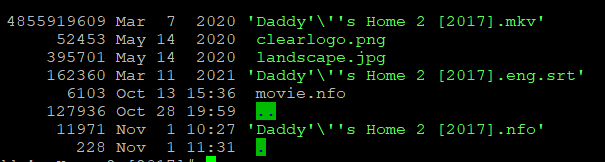
As a side note, i get the blurhash error, but only on files that don't exist, which i find strange that it would try to do something to an image file, without first grabbing the image file if it's not detected.
and it's no permissions issues, as you can see the .nfo was built today (by jellyfin), without issues.
@Petitgnoll6 commented on GitHub (Dec 3, 2021):
Yes it was indeed this inotify modification that fixed the error (but i don't know if it fixed my background problems or scan time, but i don't have any issue regarding those anymore).
And i had the blurhash error only on missing files. I think i fixed it by rescanning manually using "replace metadata + replace existing images". Then no more black background and no more blurhash error due to missing files.
@rbkn commented on GitHub (Nov 18, 2022):
I found adding some additional RAM to the server after noticing that
free -mwas sometimes showing paging fixed this issue for me.@MainServerSpace commented on GitHub (Dec 18, 2022):
I'm also affected by this issue

@gazhay commented on GitHub (Jan 1, 2023):
Just hitting this issue.
Had a drive fail and so lost some library content. Do I really have to delete my library and rescan everything because one or two files went awol?
@gazhay commented on GitHub (Jan 1, 2023):
Even worse, went to rescan the whole library and it is failing seconds after it starts.
Now cannot scan or update libraries at all. Even if I create a new one from scratch :-O
@daves00 commented on GitHub (Feb 23, 2023):
I have solved this issueon my server by moving my music library to a different disk folder, adding it to JF and removing the older folder.
@redthing1 commented on GitHub (May 5, 2023):
I still have this issue.
@edrock200 commented on GitHub (Jul 17, 2023):
I'm getting a ton of these errors too, but not file not found, but rather "Object reference not set to an instance of an object"
I've confirmed the file exists, has correct permissions and is a valid jpg image
System.NullReferenceException: Object reference not set to an instance of an object. at BlurHashSharp.SkiaSharp.BlurHashEncoder.Encode(Int32 xComponent, Int32 yComponent, String filename, Int32 maxWidth, Int32 maxHeight) at Jellyfin.Drawing.Skia.SkiaEncoder.GetImageBlurHash(Int32 xComp, Int32 yComp, String path) at Emby.Drawing.ImageProcessor.GetImageBlurHash(String path, ImageDimensions imageDimensions) at Emby.Server.Implementations.Library.LibraryManager.UpdateImagesAsync(BaseItem item, Boolean forceUpdate) [2023-07-17 22:29:47.856 +03:00] [ERR] [22] Emby.Server.Implementations.Library.LibraryManager: Cannot compute blurhash for "/redacted/path/to/poster.jpg"@nuttapillar commented on GitHub (Aug 30, 2023):
[2023-08-31 07:11:27.609 +09:30] [ERR] [47] Emby.Server.Implementations.Library.LibraryManager: Cannot compute blurhash for "/Media/Photos/2023-01-16 - Mannum/DJI_0767-HDR-Enhanced.dng"
System.NullReferenceException: Object reference not set to an instance of an object.
@fermulator commented on GitHub (Sep 5, 2023):
Yes, "ditto" - stdout logs are spewing many errors like this during initial media scan. Using docker installation (https://jellyfin.org/docs/general/installation/container/#docker).
@johnhamelink commented on GitHub (Sep 12, 2023):
I'm using NixOS, and I'm also seeing this. My music directory seems to be imported, but movies & TV show libraries are almost empty. My libraries, cache & metadata are all stored in ZFS datasets. It seems like the importing fails after just one import, yet it continues in a failed state, hence the errors related to blurhash?
@Azmodeszer commented on GitHub (Nov 25, 2023):
I'm running Jellyfin natively on Ubuntu 22.04.3 and I am also getting thousands of these in my log:
@prahal commented on GitHub (Dec 10, 2023):
Here is the failing image:
[06:03:07] [ERR] [21] Emby.Server.Implementations.Library.LibraryManager: Cannot compute blurhash for Adafruit Learning System_files/tools_IBM_002.jpg
System.NullReferenceException: Object reference not set to an instance of an object.
at BlurHashSharp.SkiaSharp.BlurHashEncoder.Encode(Int32 xComponent, Int32 yComponent, String filename, Int32 maxWidth, Int32 maxHeight)
at Jellyfin.Drawing.Skia.SkiaEncoder.GetImageBlurHash(Int32 xComp, Int32 yComp, String path)
at Emby.Drawing.ImageProcessor.GetImageBlurHash(String path, ImageDimensions imageDimensions)
at Emby.Server.Implementations.Library.LibraryManager.UpdateImagesAsync(BaseItem item, Boolean forceUpdate)
PS: Please before adding your report to this issue, check you have
BlurHashSharp.SkiaSharp.BlurHashEncoder.Encodein the error (File not foundis another issue).@zarlin commented on GitHub (Feb 14, 2024):
I'm running into this issue as well, here is one of the stack traces, the log is riddled with them.
I checked the file in question, and it looks like a 100% normal image file.
The permissions look OK to me, but I'm not yet very experienced with linux permissions:
I do see a lot of characters getting escaped in the file path, maybe the Skia library doesn't handle those characters well?
Server info:
@zarlin commented on GitHub (Feb 17, 2024):
Interestingly enough this issue no longer occurs since I disabled "Enable real time monitoring" for all libraries. Maybe the files were not accessible because they got locked by the monitoring process, or something along those lines.
I made this change based on one of the FAQ entries of the FreeBSD Jellyfin port, while trying to solve (seemingly unrelated) "name not resolved" errors.
@prahal commented on GitHub (Feb 26, 2024):
Sadly by disabling real-time monitoring you also disable the scan of the library to check for files that failed to be processed.
Thus it did not fix the bug but only stopped the process that scanned the files and was failing on any files.
If you trigger a manual scan the error will resurface.
Also, without a manual scan or restoring this real-time monitor, new content will not be added to the library, or at least thumbnails and such won't be generated.
@cvium commented on GitHub (Feb 26, 2024):
You can enable or increase the frequency of the scheduled library scan task
@KodeToad commented on GitHub (Mar 12, 2024):
I see this problem frequently in jf 10.8.13 too
It has been upgraded several times.
All those images look normal
@SkalCore commented on GitHub (Apr 14, 2024):
also have this error message in the logs with Version: 10.8.13, using docker
@upuldi commented on GitHub (Apr 24, 2024):
This fixed it. Thank you.
@samumatic commented on GitHub (May 14, 2024):
In Version 10.9.1 the issue is still there, but crashes my jellyfin docker container. Im not sure if it is related, but this are the last errors that occured:
Logs
@felix920506 commented on GitHub (Sep 3, 2024):
Info copied from #12106 :
@felix920506 commented on GitHub (Sep 3, 2024):
marking this as confirmed as info provided in duplicate issue #12106 was used to successfully reproduce the issue for more than one user.
@robotreto commented on GitHub (Oct 14, 2024):
Bug is still present in 10.10.0 :
[2024-10-14 10:06:02.198 +02:00] [ERR] [21] Emby.Server.Implementations.Library.LibraryManager: Cannot compute blurhash for "C:\Users\Reto\AppData\Local\jellyfin\metadata\People\M\Michael Fassbender\folder.jpg" System.NullReferenceException: Object reference not set to an instance of an object. at BlurHashSharp.SkiaSharp.BlurHashEncoder.Encode(Int32 xComponent, Int32 yComponent, String filename, Int32 maxWidth, Int32 maxHeight) at Jellyfin.Drawing.Skia.SkiaEncoder.GetImageBlurHash(Int32 xComp, Int32 yComp, String path) in G:\Downloads\jellyfin-master\src\Jellyfin.Drawing.Skia\SkiaEncoder.cs:line 199 at Jellyfin.Drawing.ImageProcessor.GetImageBlurHash(String path, ImageDimensions imageDimensions) in G:\Downloads\jellyfin-master\src\Jellyfin.Drawing\ImageProcessor.cs:line 403 at Emby.Server.Implementations.Library.LibraryManager.UpdateImagesAsync(BaseItem item, Boolean forceUpdate) in G:\Downloads\jellyfin-master\Emby.Server.Implementations\Library\LibraryManager.cs:line 1933@gnattu commented on GitHub (Oct 14, 2024):
Is this poster also a super huge picture? Can you upload it? Because I suspect it only happens to certain pictures.
@robotreto commented on GitHub (Oct 14, 2024):
Not really, just regular JPG, 1000*1500, here you can download them :
SkiaEncoderCrashingPics.zip
@gnattu commented on GitHub (Oct 20, 2024):
These files look fine to me and actually is passing the unit test for Blurhash. Maybe there is a small possibility that the compute blurhash was executed earlier than the files are actually fully written to the disk. But from the current code it really should not happen?
@gnattu commented on GitHub (Oct 20, 2024):
If my theory is correct, adding a new line changing the async write option to
WriteThroughcould workaround this issue:b3da2ff8f4/MediaBrowser.Providers/Manager/ImageSaver.cs (L292-L293)But I'm unable to reproduce this myself so I need someone else to test this.
@robotreto commented on GitHub (Oct 22, 2024):
Maybe I should add skia by source instead of the dll, and then catch the exception with the debugger.
@AlexGustafsson commented on GitHub (Nov 6, 2024):
Here's a 2048x1152 (421KB) png that also causes this issue. It fails when the file is added to disk and a metadata update from Jellyfin is requested. It does not fail when adding the image via the UI.
backdrop.png.zip
@mickyt71 commented on GitHub (Nov 26, 2024):
I have this all the time. Slow imports, constant errors in the logs. Running 10.10.3 docker instance on a Linux CentOS 7.6 host.
@h0tw1r3 commented on GitHub (Jan 17, 2025):
In my case, the files have not changed (permissions or otherwise) in a very long time.
200k+ of these messages (80mb) over the last two days:
@robotreto commented on GitHub (Jan 22, 2025):
Here is what happens : sometimes SKCodec.Create(filename) returns null for a perfectly normal jpg :

however, the Encode function does not check for null, therefore triggering the Exception.
So I suggest to fix the SKCodec.Create() and also check the result for null.
@gnattu commented on GitHub (Jan 22, 2025):
We all know this but the reason is why?
If that file is perfectly normal this method should not return null, and if it returns null it does mean cannot compute blurhash. We are just ignoring this file. And no, we cannot fix SKCodec.Create() because this is SkiaSharp internal method.
By looking at the libskia source code it looks like the only reason this is null is that skia cannot open the file handle pointed and that path. If that is not permission and you are sure the files are perfectly fine, does that mean jellyfin already hit the maximum open file limit on your system so that it cannot open more files?
@robotreto commented on GitHub (Jan 22, 2025):
Now I remember : when I was debuging with the above screenshot and the server was halted at that exception, I wanted to open the jpg in question with MS Photos, it was denied with the error that the jpg was open in another application. So I resumed the thread and after that, MS photos could open the jpg. That means that SkiaSharp opens the jpg not in a shared-readonly way. I also noticed that the Encode function is called by multiple threads at the same time. So what if 2 threads would like to encode the same jpg at the same time ? This would also trigger the null pointer, right ? On the other hand, the probability for this scenario is near zero.
@gnattu commented on GitHub (Jan 22, 2025):
It is not near zero if it is what caused the issue here. The compute process could take a few seconds and race condition could occur.
This should be changed anyway. There is no reason to block other applications from reading the same file when the blurhash compute is a readonly operation.
@robotreto commented on GitHub (Jan 23, 2025):
I built my own blurhash DLL's with the code from your commit, and it fixed that race condition problem. Thanks for your quick action!
However I found a new System.ObjectDisposedException, when JPG's are invalid (in my case the JPG had a length of 0)

It happened when I manually triggered a rescan with the option "Replace all Metadata" together with "Replace existing images".
Can it be that one thread is busy creating fresh Metadata JPG's and another thread tries to blurhash them at the same time, before they are finished ?
Because after another scan the JPG in question had no more 0 bytes, but 21kb and was perfectly valid....
Does a shared read-only fileopen work on a file which is being written to by another thread at the same time ?
@gnattu commented on GitHub (Jan 23, 2025):
This is exactly what I speculated before:
The writer thread of our own image saver does not allow sharing at all which means the file cannot be opened before the write has completed. Did you try the cache mode change I mentioned earlier to see if that makes things better?
https://github.com/jellyfin/jellyfin/issues/3687#issuecomment-2424569073
@robotreto commented on GitHub (Jan 23, 2025):
okay, I added this one line you mentioned on October 20 : in ImageSaver.cs
fileStreamOptions.Options = FileOptions.WriteThrough;After that the above exception also vanished, meaning you were right all along!
Then I reverted to the old version of Encode, (without the shared-readonly fileopen), but then the NullReference exception came back.
So It seems we need both modifications. It is not just a concurrent metadata jpg creation and blurhash computation on the same file.
@ryannathans commented on GitHub (Mar 11, 2025):
Bug still exists, 10.10.6
Hundreds and hundreds of these in my logs
@konsumer commented on GitHub (Apr 1, 2025):
yep, me too. is it something specific to docker?
I am using this in my docker-compose, on linux host:
@ryannathans commented on GitHub (Apr 1, 2025):
I'm not even on linux, so no docker. I'm on FreeBSD
@prahal commented on GitHub (Apr 6, 2025):
@ryannathans @konsumer could you open a new bug report. The symptom is the same, but the cause is different.
Easier to split bug thread by root cause.
@enter-a-random-username commented on GitHub (Apr 9, 2025):
@theguymadmax my issue was closed in favor of this, and it isn't fixed!
@ryannathans commented on GitHub (Apr 10, 2025):
Please continue discussion here if not fixed: #13886
@enter-a-random-username commented on GitHub (Apr 10, 2025):
No
@theolaa commented on GitHub (Nov 17, 2025):
I'm also experiencing this issue. The image in question has rather extreme dimensions which I suspect is the cause. It's 436x19594, so you know, I get it. But still.