mirror of
https://github.com/jellyfin/jellyfin.git
synced 2026-01-24 07:30:57 +01:00
Tv show(anime): episode sequence is wrong when using absolute display order #1656
Labels
No labels
area:database
awaiting-feedback
backend
blocked
breaking change: web api
bug
build
ci
confirmed
discussion needed
dotnet future
downstream
duplicate
EFjellyfin.db
enhancement
feature
future
github-actions
good first issue
hdr
help wanted
invalid
investigation
librarydb
live-tv
lyrics
media playback
music
needs testing
nuget
performance
platform
pull-request
question
regression
release critical
requires-web
roadmap
security
security
stale
support
syncplay
ui & ux
upstream
wontfix
No milestone
No project
No assignees
1 participant

Notifications
Due date
No due date set.
Dependencies
No dependencies set.
Reference: starred/jellyfin#1656
Loading…
Add table
Add a link
Reference in a new issue
No description provided.
Delete branch "%!s()"
Deleting a branch is permanent. Although the deleted branch may continue to exist for a short time before it actually gets removed, it CANNOT be undone in most cases. Continue?
Originally created by @kerhbal on GitHub (May 7, 2020).
Describe the bug
for anime, episode sequence is wrong when using absolute display order
in my case, there is no mismatch, just the sequence is wrong.
System (please complete the following information):
To Reproduce
My folder:(I copied these two episodes to a new library just as a test case)
when using aired display order(the normal one):

you can see the episode1 and episode36 are in the correct order
when using absolute display order:
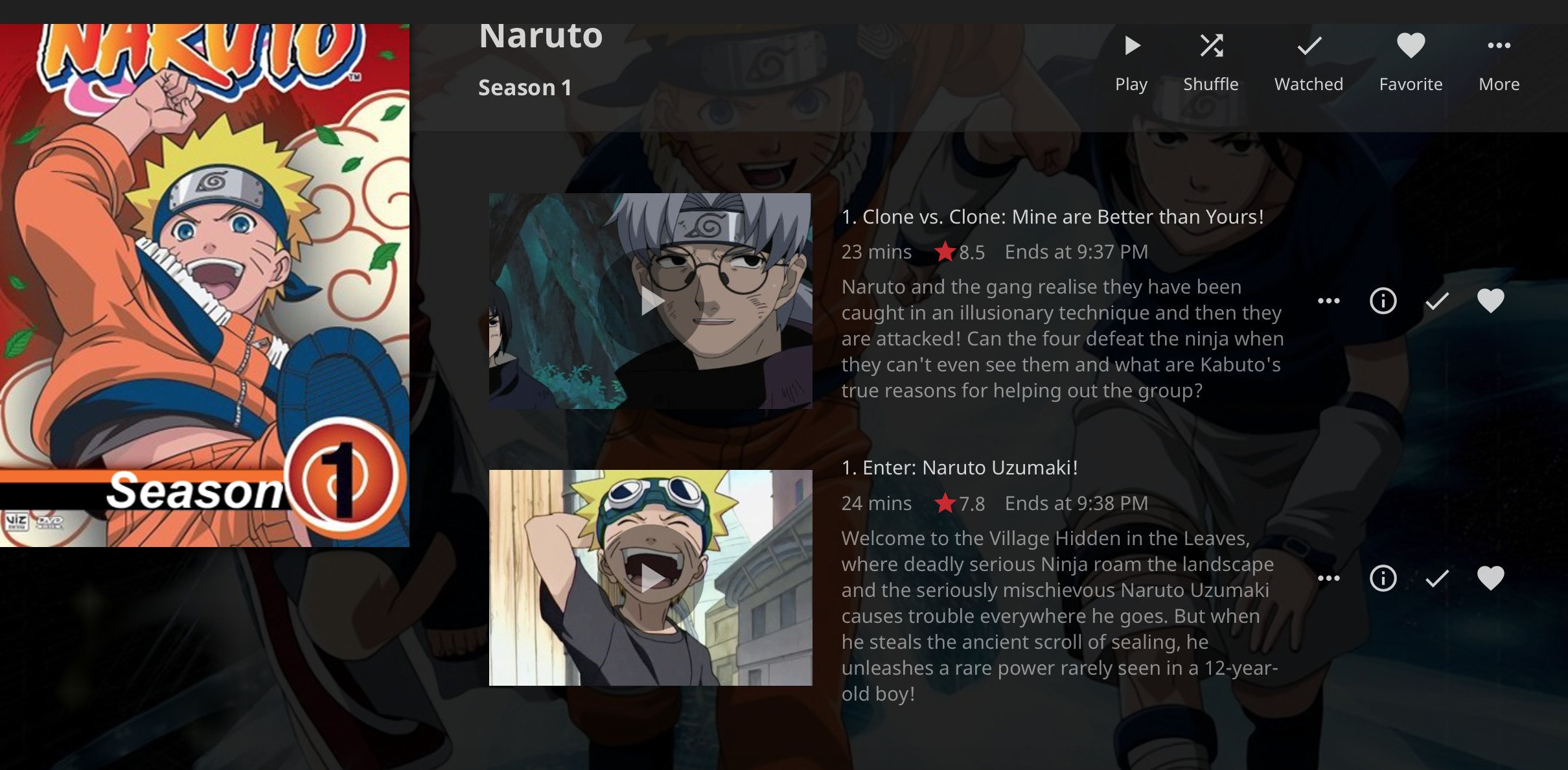
you can see that the titles are correct, which means there is no mismatch, but the number before titles are both
1, and the sequence is wrongExpected behavior
in both scenarios(aired or absolute display order), the episode with title "Enter: Naruto Uzumaki!"(the first episode) should list before any other episodes.
Thank you!
@Artiume commented on GitHub (May 7, 2020):
related issues
https://github.com/jellyfin/jellyfin/issues/1180
https://github.com/jellyfin/jellyfin/issues/2446
@dominikh commented on GitHub (Jun 22, 2020):
This doesn't really seem related to either of those issues.
What I think is happening here is that the episode number field in the metadata gets incorrectly populated from the season-based numbering, not the absolute numbering.
For example, consider https://www.thetvdb.com/series/is-this-a-zombie
When using absolute display order, this occurs:
The first three "episode 1" are the first episodes in season 2, season 1 and season 0 respectively. Looking at the metadata, all 3 episodes have season 1 and episode 1. The same pattern continues with the other episodes.
The incorrect sorting is then merely a side-effect of sorting on the incorrect episode numbers. All 1's followed by all 2's and so on.
@kerhbal commented on GitHub (Jun 23, 2020):
@dominikh this totally makes sense, thank you for sharing!
@lmaonator commented on GitHub (Aug 24, 2020):
Ran into the same issue.
It seems like the Tvdb plugin correctly queries the metadata with absoluteNumber but then doesn't handle "absolute" order in MapEpisodeToResult():
93fe595e5e/MediaBrowser.Providers/Plugins/TheTvdb/TvdbEpisodeProvider.cs (L151-L163)It only handles "dvd" order here.
In the case of "absolute" it incorrectly defaults to AiredEpisodeNumber.
@lmaonator commented on GitHub (Sep 5, 2020):
I can't reproduce this for episode 36 in the OP, only for S02E01 which is absolute order E58 as explained by @dominikh above.
I submitted a pull request for that case.
@stale[bot] commented on GitHub (Jan 3, 2021):
This issue has gone 120 days without comment. To avoid abandoned issues, it will be closed in 21 days if there are no new comments.
If you're the original submitter of this issue, please comment confirming if this issue still affects you in the latest release or nightlies, or close the issue if it has been fixed. If you're another user also affected by this bug, please comment confirming so. Either action will remove the stale label.
This bot exists to prevent issues from becoming stale and forgotten. Jellyfin is always moving forward, and bugs are often fixed as side effects of other changes. We therefore ask that bug report authors remain vigilant about their issues to ensure they are closed if fixed, or re-confirmed - perhaps with fresh logs or reproduction examples - regularly. If you have any questions you can reach us on Matrix or Social Media.